Tag Audit Guide: How to Audit Your Analytics Tags
Summary
A tag audit is a systematic review of every tracking tag and script running on your website, checking which tags are present, whether they fire correctly, and what data each one collects. It confirms your analytics and marketing data is accurate and complete, and flags unapproved or misbehaving tags before they distort your reporting or leak data.
Tags are the small scripts that measure traffic, user behavior, and conversions. As a site grows, the number of tags and tracking scripts grows with it, and it gets harder to know what is firing, where, and what it is sending. A tag audit is how you get that picture back. This guide covers what a tag audit checks, how to run one manually or with software, how auditing differs from management and monitoring, and where tag audits meet privacy compliance.
You can run a tag audit by hand on a few pages, or with software across the whole site. The steps below work either way, and the later sections cover when one audit is enough and when you need ongoing monitoring.
How to run a tag audit
You can run a tag audit by hand or with automated software. The steps are the same either way. Automation matters most at scale, for example on a site with hundreds of pages and many tags.

- Inventory every tag on the site. List each tag and tracking script that loads, across the whole site rather than a few sample pages. Rogue and duplicate tags usually hide on the pages nobody checks.
- Confirm each tag fires where it should, and only there. Check that required tags fire on the pages that need them, and that no tag is firing where it should not.
- Inspect the data payload. Look at what each tag actually sends, not just whether it fired. A tag can fire correctly and still pass the wrong values, or values it should never send.
- Test across consent states. Check what fires before a visitor consents and after, so you know your tags respect the choices your consent banner records.
- Flag the problems. Note missing, duplicate, broken, or unapproved tags, and any payload that looks wrong, so they can be fixed.
- Re-run on a schedule. Tags change, and new ones get added. A single audit is a snapshot. Repeat it, or monitor continuously, to keep the data trustworthy over time.
What does a tag audit check?
A tag audit examines which tags are on the site and what each one is doing. A thorough audit reports on:

- Whether required tags are present, and whether any unapproved or unexpected tags are firing
- Whether each tag fires correctly on the right pages
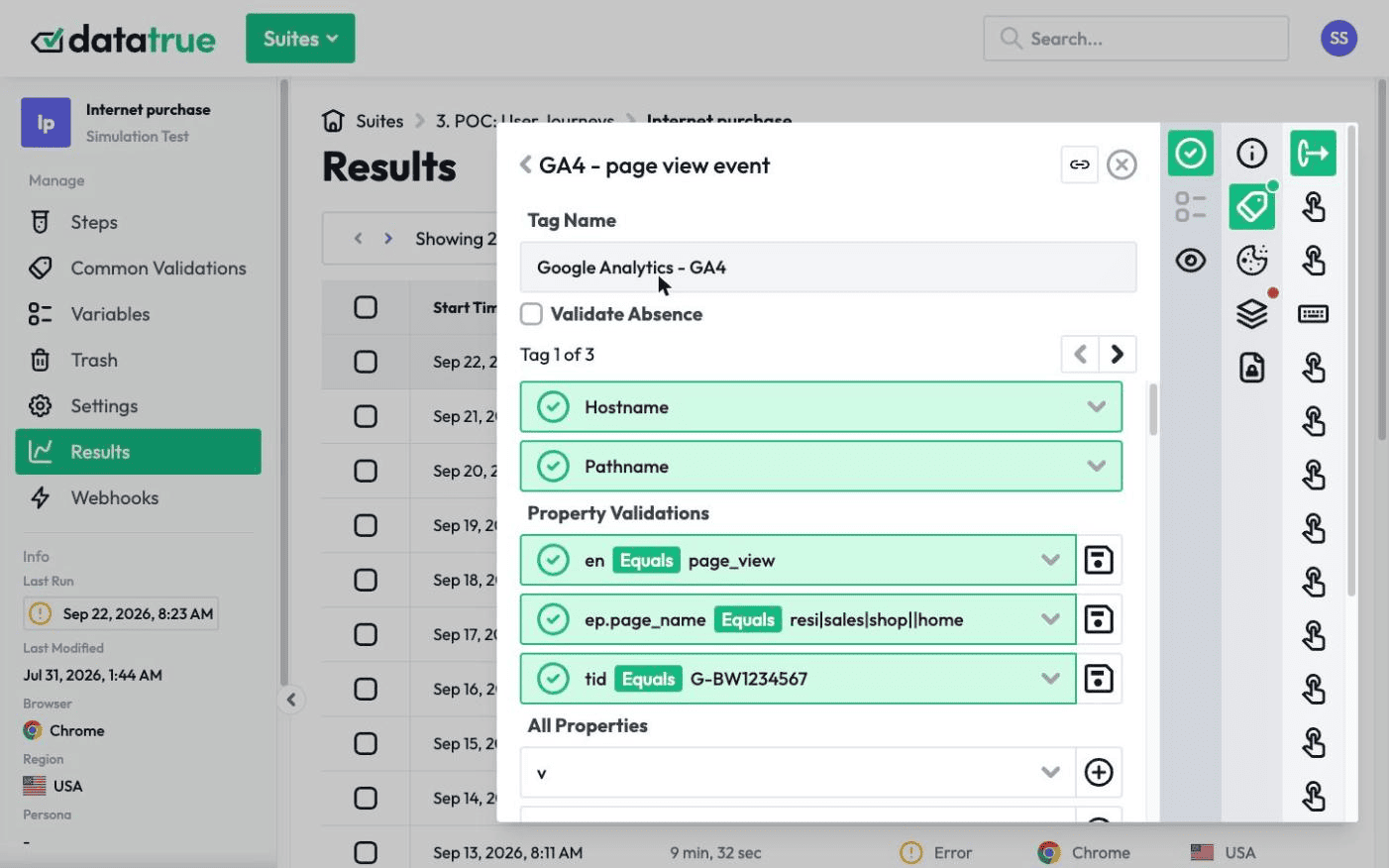
- The data payload each tag sends, including the values passed to analytics and ad platforms
- Duplicate tags, missing tags, and tags that fail to load
- Page load times affected by tags
- Errors written to the browser console
Manual vs automated tag audits
Manual and automated audits are the two ways to check that tags work correctly and return reliable data.
A manual audit means a person inspects and tests tags directly. It can go deep on a single page or a single tag. It does not scale well, because a person has to repeat the work for every page and every change.
An automated audit uses software to scan the site and flag issues and inconsistencies on its own. It covers far more pages in far less time, and it can run on a schedule so problems surface as they appear rather than at the next manual review.
In practice the two work together. Automated auditing handles breadth and repetition. Manual review handles the judgment calls the software raises. DataTrue’s web analytics testing runs automated tag audits across live pages and produces a page-level report for each one, covering tag validations, data payloads, load times, and console errors.
How does the data layer help with tag auditing?
The data layer is a structured place on your site that holds the values passed from the page to your tag management system, so tags read from one consistent source instead of scraping the page.
Auditing the data layer is a more complete form of tag auditing, because it checks the values feeding your tags, not only whether the tags fired. If the data layer is wrong, a tag can fire perfectly and still report the wrong thing. Validating the data layer catches those errors across a full user journey. DataTrue’s Data Layer Validation checks the data layer as part of a test and alerts on issues that need a human to review.
Is tag management the same as tag auditing?
No. Tag management and tag auditing have different jobs, though the terms are often used interchangeably.
Tag management is the process of organizing and deploying tags, usually through a tag management system. Tag auditing is the process of validating those tags, so you know they fire correctly and collect accurate data. Management puts tags on the site. Auditing checks that they are doing what they should. For the deployment side, see our guide to tag management.
Tag management system vs tag auditing tool
A tag management system (TMS) is a web interface that controls and deploys every tag on a site from one place. Instead of hard-coding each tag, the site loads a single container that manages them. The trade-off is that one container managing every tag also introduces a single place for inconsistencies and errors to creep in.
A tag auditing tool checks the result. It lets you schedule tests and confirm that changes to your site have not broken your tag setup. A TMS and an auditing tool solve different problems, and a team that runs a TMS still needs a way to audit what it deploys.
Tag auditing vs tag monitoring
Tag auditing validates and checks tags at a point in time. Tag monitoring is the continuous version, tracking tags over time and catching broken or missing tags as they happen.
Both keep your data accurate. An audit tells you the state of your tags today. Monitoring tells you when that state changes. Run an audit first to establish a clean baseline, then monitor to hold it. DataTrue leads with continuous testing and monitoring of live sites and apps, and adds scheduled audits and pre-publish testing on top.
What is tag governance?
Tag governance is the practice that ties auditing and monitoring together with ownership and rules. It covers both checking tags and tracking them over time, and it adds defined ownership, roles, and responsibilities for how tags are implemented, plus checks that tags comply with privacy regulations. Governance is what keeps a tag setup accurate as the team and the site change.
Tag audits and privacy compliance
A tag audit is also a privacy check. The same review that tells you whether a tag fired tells you what data it sent, to whom, and whether it fired before a visitor consented.
This matters because tracking tags can collect personal data (PII, or personally identifiable information) and share it with third parties like analytics and advertising platforms. A misconfigured pixel can send data before consent, or send values it should never touch. The GDPR (the EU’s General Data Protection Regulation), the CCPA and CPRA (California’s privacy laws), and state laws that require honoring opt-out signals like Global Privacy Control (GPC) set rules for what tags may collect and when. An audit that inspects payloads and tests consent states is how you check your site against those rules in practice.
Whether a specific tag or setup is compliant is a separate question, and the answer depends on the law and your configuration. For the legal angle, see our privacy and compliance resources. For what individual tags collect and where that data goes, see What Your Tags Actually Collect.
Why tag auditing matters
Decisions made on inaccurate data are worse than decisions made on no data, because they carry false confidence. Tags are central to analytics accuracy, and tags deployed incorrectly introduce discrepancies that quietly distort what you see.
This risk grows with scale. When many tags are deployed, whether through a tag management system or hand-coded one by one, there are more chances for a broken snippet, a missing tag, or a wrong value. At the enterprise level, the volume of tags raises the odds that something is wrong at any given moment. Tag audits are how teams find those problems before they reach a report.
Is one tag audit enough?
No. A one-off audit is better than none, but it only describes a single moment. Tags are dynamic. They change, and new tags get added, so a clean audit today says nothing about next month.
Regular audits, or continuous monitoring, are what keep data accurate over time. This is especially true for enterprise tag management, where the scale and pace of change mean issues appear constantly. Repeating the audit is how you catch them as they happen rather than at the next review.
Run a tag audit with DataTrue
DataTrue audits tags across your live site and native mobile apps, and adds pre-publish testing against draft GTM Preview and Adobe Tags containers before changes go live. Coverage tests crawl your whole site and report what is tagged on every page. Simulation tests walk a defined journey, like a checkout or a signup, step by step and in each consent state, and check what each tag sent at every step. Both read the data payload, not just whether a tag fired.
A tag audit with DataTrue can:
- Test tags across multiple browsers
- Find missing or duplicate tags
- Schedule test runs for automated QA
- Test in lower environments protected by authentication
- Run tests from multiple countries
- Use the DataTrue tag library or add custom tags for testing
- Run tests in tag manager preview mode
- Test tags with delayed beacons, and interactions in iframes and AJAX content
Questions
What is a tag audit?
A tag audit is a systematic review of every tracking tag and script on your website. It checks which tags are present, whether they fire correctly, and what data each one collects, so your analytics and marketing data stays accurate and no unapproved tag is running unnoticed.
How do you run a tag audit?
Inventory every tag across the whole site, confirm each fires where it should and only there, inspect the data each one sends, test what fires before and after consent, flag anything missing, duplicated, broken, or unapproved, then re-run on a schedule. You can do this manually or with automated software.
What is the difference between tag auditing and tag monitoring?
Auditing checks your tags at a point in time. Monitoring is continuous, tracking tags over time and catching broken or missing tags as they happen. Audit first to set a clean baseline, then monitor to keep it.
Is tag management the same as tag auditing?
No. Tag management is deploying and organizing tags, usually through a tag management system. Tag auditing is validating those tags to confirm they fire correctly and collect accurate data.
How often should you run a tag audit?
A one-off audit only describes a single moment, and tags change constantly. Run audits regularly, or monitor continuously, especially at enterprise scale where the volume of tags means issues appear often.
Can a tag audit find privacy and compliance problems?
Yes. An audit that inspects data payloads and tests consent states can show whether a tag collects personal data, where that data goes, and whether it fires before a visitor consents, which are the questions behind the GDPR, the CCPA, and state laws that require honoring opt-out signals like GPC. Whether a given setup is compliant depends on the law and your configuration.
Know what your tags send, page by page
DataTrue runs real journeys on your site and checks each tag’s data against what you expect, field by field. A missing event or a wrong value shows up in a test before it reaches a report.
- Every page, with coverage scans
- Scheduled runs, with alerts when a result changes
- Full journeys, like checkout and signup, in each consent state
- What each tag sent, field by field
- PII detection with test personas
- iOS and Android app testing
- Pre-publish testing for GTM and Adobe Tags
- REST API, plus Slack and Jira alerts
The full platform, every feature, free for 30 days.