What Is PII Scanning? Tools, Methods, and a Checklist

Summary
PII scanning is the process of discovering where your business collects and stores personally identifiable information, so you can secure it or dispose of it. It covers the obvious places, like databases and files, and the easily missed one: the personal data your website tags and cookies quietly send to third parties.
Most businesses store more personal data than they intend to. It accumulates in old form submissions, exported spreadsheets, backup drives, and the tracking tags running on every page. PII scanning is how you find all of it, which is the first step in any real compliance effort. This guide explains what PII scanning is, when to run it, and a 6-step checklist to do it well.
The checklist starts with a physical audit and a stock-take of devices and servers, then moves to the scan itself. It also includes a tag and cookie audit, because tracking tags are one of the places personal data ends up.
What is PII?
PII stands for personally identifiable information: any data that can be used to identify an individual. That includes names, addresses, phone numbers, credit card details, and email addresses. It also includes online identifiers like an IP address or a cookie ID, which is why your website tags are a PII question and not just your internal systems.
For the wider picture of how PII is regulated, see our guide to PII compliance.
What is PII scanning?
PII scanning is a process undertaken to discover the personal data your business is accumulating. Your business is likely storing PII without intending to, across devices, servers, files, and the third-party tags on your website. A scan locates that data so you can decide what to keep, secure, or delete.

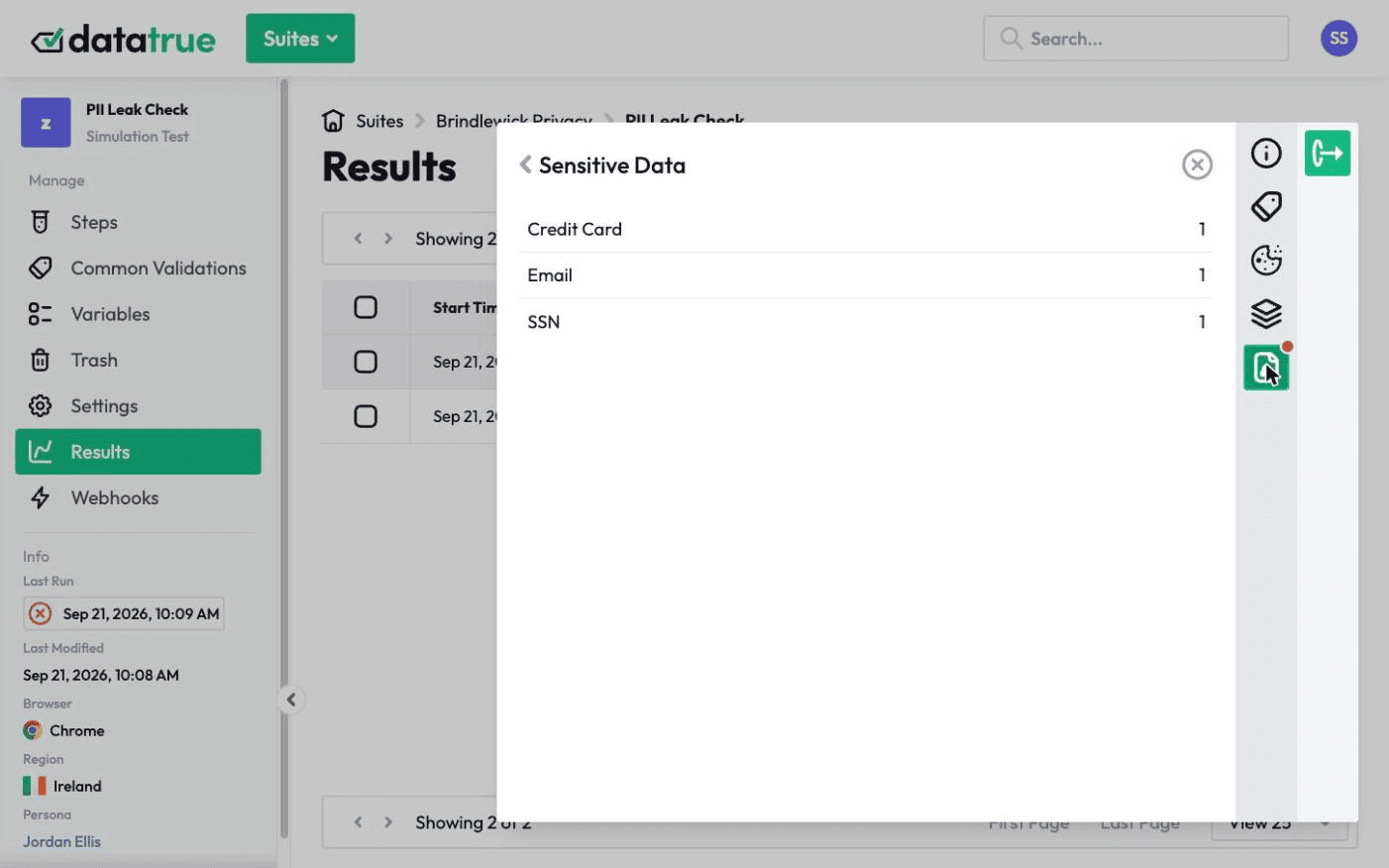
There are two sides to it. Data-at-rest scanning looks through your stored files and systems. Data-in-motion scanning looks at what your website sends as people use it, catching tags that transmit an email address or other identifier to an ad platform or analytics vendor. Both matter, because a leak in motion never touches a file you could scan at rest.
When should you use a PII scanning tool?
Run a scan whenever you cannot confidently answer the question “what personal data do we hold, and where.” In practice that means before a compliance audit, after adding or changing marketing tags, when preparing a record of processing activities, and on a regular schedule so new leakage is caught early rather than discovered by a regulator.
The website side deserves particular attention. Tags change often, vendors update their scripts without telling you, and a marketing team can add a pixel in minutes. Any of those can start sending personal data you never signed off on.
Complying with the General Data Protection Regulation
The GDPR is the reason many organizations run PII scans in the first place. It requires you to know what personal data you process, to hold it lawfully and securely, and to be able to respond to a data subject access request by producing everything you hold about a person. You cannot meet any of those obligations without first knowing where the data is.
Scanning also supports the GDPR’s data minimization principle: once you can see what you collect, you can stop collecting what you do not need. For the tag-level detail, see GDPR for analytics tags.
The PII scanning checklist
These six steps establish a repeatable process rather than a one-off cleanup.
1. Conduct a physical audit
Start with what is offline: paper records, printouts, and any physical files that hold personal data. These are easy to forget and hard to secure, so account for them before moving to digital.
2. Take stock of devices and servers
List every device and server that could hold personal data, including staff laptops, shared drives, cloud storage, and backups. You are building the map of places a scan needs to reach.
3. Conduct a PII scan for devices and servers
Run a scanning tool across that inventory to find the personal data actually stored on it. Expect to find data in places nobody remembered, which is the point of scanning rather than guessing.
5. Secure or dispose of data
For everything the scan found, decide: keep and secure it, or delete it. Encrypt sensitive PII, restrict who can access it, and remove anything you have no lawful reason to hold. Less stored data means less to protect and less to lose.
6. Set future processes
A single scan goes stale the moment a new tag ships or a new form goes live. Schedule scans on a recurring basis, monitor your tags for changes, and assign someone ownership of the process, so PII scanning becomes a standing control rather than a fire drill.
DataTrue helps with the parts of this that live in your tags and cookies. It detects PII leakage using fictitious personas, audits your cookie behavior, and alerts you when a change starts sending data it should not.
Questions
What is PII scanning?
It is the process of finding where your organization collects and stores personally identifiable information, so you can secure or delete it. It covers stored data in files and systems, and data in motion, meaning the personal data your website tags and cookies send to third parties as people use your site.
Why does website tracking matter for PII scanning?
Because tags and cookies transmit personal data, like an email address or an IP, to third parties in real time. That data never lands in a file you could scan at rest, so a scan that only looks at stored data misses it entirely. Auditing what your tags actually send is the only way to catch it.
How often should I run a PII scan?
On a recurring schedule, and after any change to your marketing or analytics tags. Tags change frequently and vendors update their scripts without notice, so a scan that was clean last quarter can be leaking today.
How do I scan for PII without exposing real customer data?
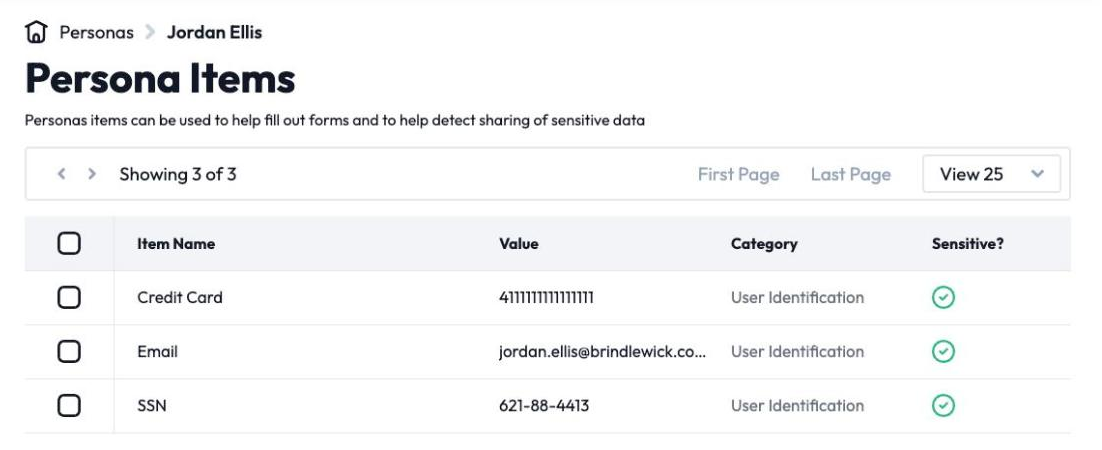
Use fictitious personas: invented profiles with fake names, emails, and payment details. Submitting those through your forms and watching what the tags transmit lets you test for a leak without ever putting a real person’s data at risk. DataTrue uses this approach for its tag and cookie scanning.
What is the difference between PII scanning and a cookie audit?
A cookie audit inventories the cookies your site sets and what they store. PII scanning is broader: it looks for personal data everywhere it accumulates, including in tag payloads sent to third parties. The two overlap on the website, and running both gives you the full picture.
Find personal data in your tags before an ad platform does
DataTrue fills your forms with test personas and reads each tag request for emails, names and card numbers. A leak shows up in a test, with the tag and the page that sent it.
- Every page, with coverage scans
- Scheduled runs, with alerts when a result changes
- Full journeys, like checkout and signup, in each consent state
- What each tag sent, field by field
- PII detection with test personas
- iOS and Android app testing
- Pre-publish testing for GTM and Adobe Tags
- REST API, plus Slack and Jira alerts
The full platform, every feature, free for 30 days.