What Is PII Compliance? A 7-Step Checklist for Protecting Your Data

Summary
PII compliance means handling personally identifiable information the way the privacy laws that apply to you require: collecting only what you need, storing it securely, honoring the rights people have over it, and being able to show you did. If your business touches customer data, meeting those rules is what avoids fines and protects the people whose data you hold.
Data handling by private organizations has always been a concern, and recent privacy laws have put it under real scrutiny. Consumers and lawmakers both want private data stored safely and kept away from bad actors. This guide breaks down what PII compliance is, which regulations govern it, and a simple 7-step checklist to get it right.
The checklist is the practical part. It runs from discovering and categorizing the PII you hold to reporting breaches and building a long-term strategy.
What does PII stand for?
PII stands for Personally Identifiable Information. The US Department of Labor defines it as “Information that can be used to distinguish or trace an individual’s identity, either alone or when combined with other information that is linked or linkable to a specific individual.”
What is included in PII?
Exact definitions vary by law. The following is a non-exhaustive list of data that may be considered PII: name, signature, address, phone number, date of birth, driver’s licence, passport information, credit information, photographs, IP address, biometric data, location information, email address, and social security number.
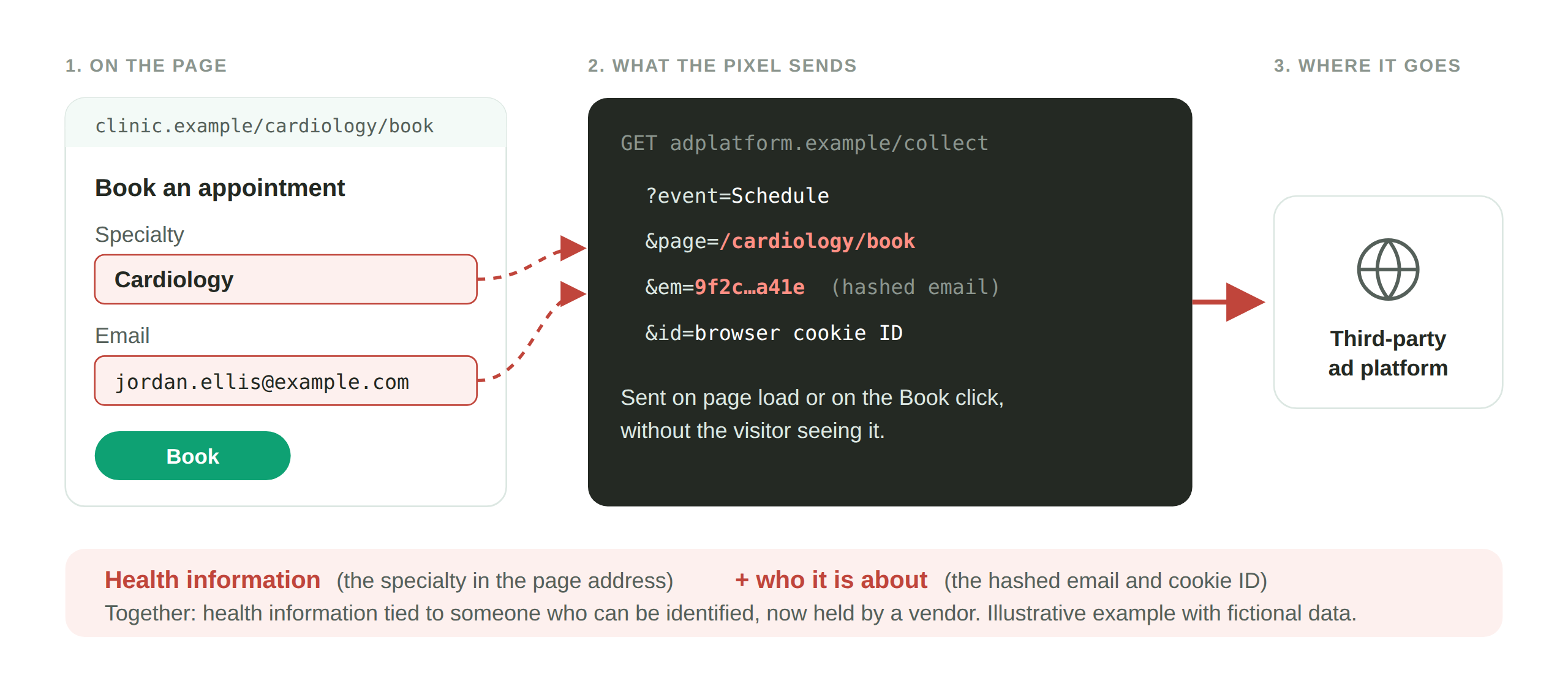
An IP address or a cookie ID counts too, which is why the tags on your website are squarely a PII question, not just your databases.
What is PII compliance?
PII compliance means an organization’s handling of personally identifiable information meets the relevant regulations. At its core, it comes down to collecting and storing personally identifying data securely, so it cannot fall into the wrong hands, and respecting the rights people have over it.
Why is PII compliance important?
For legal and ethical reasons. Falling foul of data protection rules risks major fines and other penalties, and failing to protect sensitive data can expose your customers to identity theft and other harm. That is both a moral responsibility and a matter of protecting your reputation, and it matters more as cybercrime rises.
Which regulations apply to PII?
Which data protection laws apply depends on where you operate and whose data you collect, so check the rules of every country or region you do business in. A good starting point is the European Union and California, whose laws are among the strictest and cover large populations. The EU applies the General Data Protection Regulation and the ePrivacy Directive. California applies the California Consumer Privacy Act. If your site meets these, you are on the right track.
Other significant laws include:
- Lei Geral de Proteção de Dados (LGPD), Brazil
- Personal Information Protection and Electronic Documents Act (PIPEDA), Canada
- Protection of Personal Information Act (POPIA), South Africa
- Privacy Act, Australia
- Personal Data Protection Act, Singapore
Beyond legislation, industry data standards also apply. The most notable is the Payment Card Industry Data Security Standard (PCI DSS), put in place by the major card networks for handling credit card information. It is not government law, but businesses that fail to meet it face penalties from the card networks.
Data subject access requests
A critical part of laws like the GDPR and CCPA is the data subject access request, or DSAR. Individuals have the right to find out what data is being collected about them, and to have it corrected or deleted. To respond, you need an organized approach to collecting data so you can act promptly. Respond as quickly as you can, verify the person’s identity before proceeding, and keep transparent communication throughout.
Sensitive vs non-sensitive PII
Sensitive PII is data that can directly reveal someone’s identity, such as a driver’s licence or passport. Non-sensitive PII includes information available in public records, such as names, birthdays, and addresses. The distinction matters before you start a compliance checklist, because it drives how you classify and protect each type. Sensitive PII should be kept encrypted. Non-sensitive PII still needs safeguarding, but the rules around it are looser.
The PII compliance checklist
With that background, you are ready to begin. These steps establish a process for long-term compliance with data protection standards.
1. Discover and categorize PII
To understand your responsibilities, you first have to know what PII your site collects. Investigate every form of data collection and storage, from digital files to handwritten notes.
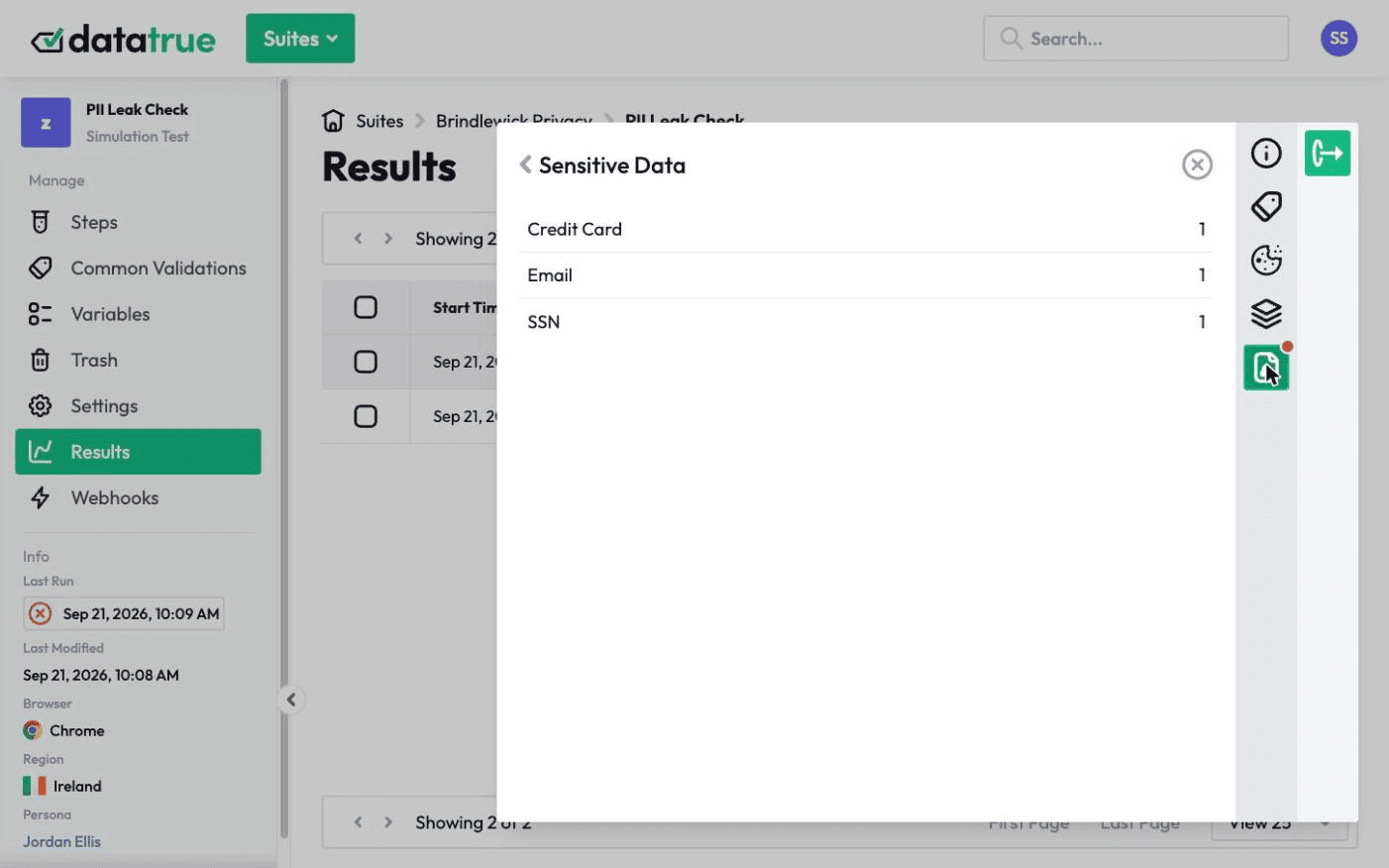
One common and overlooked source is your website’s own tags and cookies. A cookie audit uncovers what your cookies collect, and scanning for PII leakage shows whether your tags are sending personal data to third parties. DataTrue automates both, so you can see what your web properties actually collect and share rather than assuming. Then categorize your PII into sensitive and non-sensitive data, which informs the later steps.
2. Create a PII policy
Once you know the PII relevant to your business, develop a policy for managing it. Align it with the GDPR’s data processing principles: processing should be lawful, transparent, limited to what is necessary, accurate, and confidential. Your policy should cover:
- What customer data you collect, how, and why.
- How that data is stored and secured.
- An acceptable-use policy for who may access customer PII.
- Records of all access to and modification of customer data.
- A data breach response plan.
- Workflows showing how data moves through the business and third parties.
You can share the policy with users or fold it into your general privacy policy.
3. Secure PII
Create data security measures for each level of data, in line with your policy. Steps that may fit your business:
- Store customer data on secure first-party servers.
- Audit any data held on third-party servers, and question whether that is necessary or safe.
- Reconsider keeping physical records of PII.
- Add stronger measures for sensitive PII, such as encryption.
4. Implement large-scale data security
With PII-specific measures in place, build a comprehensive plan for your organization’s overall data security, because a single failure can have wide-ranging consequences. Important steps include encryption, multi-factor authentication, tag auditing and data loss prevention, password requirements, staff training on handling sensitive data, malware protection, and data security tools.
5. Identity and access management (IAM)
IAM refers to the systems that ensure tools and information are accessible only to the right users. PII, especially sensitive PII, should be accessible to as few staff as possible, which limits the risk of leakage. Best practices include multi-factor authentication, a zero-trust framework, and clear guidelines every staff member understands.
6. Report data breaches
Breach reporting is a key part of PII rules worldwide. Under the GDPR, for example, a personal data breach must be reported to the regulator without undue delay and, where feasible, within 72 hours, unless it’s unlikely to put people at risk. A report should include:
- The nature of the breach, including where possible the categories and approximate number of data subjects and records concerned.
- The name and contact details of the data protection officer.
- The likely consequences of the breach.
- The measures taken or proposed to address it, including any steps to mitigate its effects.
The GDPR also requires documentation of breaches, and affected people must be told when the risk to them is high.
7. Build a long-term strategy
Once you are compliant, create long-term procedures to stay that way, so you are not repeating this checklist from scratch each time. Your strategy should include:
- Scheduling frequent data audits.
- Staying current with developments in data protection law.
- Reviewing your security protocols and privacy policies.
- Appointing a data protection officer to lead compliance.
- Implementing a set of data security tools.
- A response plan for data subject access requests.
One gap that catches compliant-looking sites: does your consent platform actually verify that your tags stop sending personal data once someone opts out? A consent management platform records the choice, but confirming the tags follow it is a separate check. See how consent verification works, and how DataTrue and OneTrust compare.
DataTrue helps with the parts of this that live in your tags: it detects PII leakage using fictitious personas, audits your cookie and consent behavior, and gives you a timestamped record you can show a regulator.
Questions
What does PII compliance mean?
It means handling personally identifiable information in line with the privacy laws that apply to you: collecting only what you need, storing it securely, honoring people’s rights over their data, and being able to show you did. It applies to the data in your tags and cookies, not just your databases.
What counts as PII?
Any data that can identify a person directly or indirectly. That includes obvious identifiers like name, address, and social security number, and also online identifiers like an IP address or cookie ID, which is why website tags are a PII concern.
What is the difference between sensitive and non-sensitive PII?
Sensitive PII can directly reveal someone’s identity, such as a passport or driver’s licence, and should be encrypted. Non-sensitive PII, such as a name or address available in public records, still needs safeguarding but is governed more loosely.
How do I check whether my website is leaking PII?
Audit what your tags and cookies actually collect and send. A cookie audit shows what your cookies gather, and PII leakage scanning shows whether tags are transmitting personal data to third parties. DataTrue automates both using fictitious personas, so you can test without exposing real customer data.
How quickly must I report a data breach under the GDPR?
Without undue delay and, where feasible, within 72 hours of becoming aware of it, to the relevant supervisory authority, unless it’s unlikely to put people at risk. Affected people must be told when the risk to them is high, and the breach must be documented.
Find personal data in your tags before an ad platform does
DataTrue fills your forms with test personas and reads each tag request for emails, names and card numbers. A leak shows up in a test, with the tag and the page that sent it.
- Every page, with coverage scans
- Scheduled runs, with alerts when a result changes
- Full journeys, like checkout and signup, in each consent state
- What each tag sent, field by field
- PII detection with test personas
- iOS and Android app testing
- Pre-publish testing for GTM and Adobe Tags
- REST API, plus Slack and Jira alerts
The full platform, every feature, free for 30 days.