How to Verify Your Tags Respect Consent

Summary
Verifying that your tags respect consent means confirming that each tag follows the exact choice a visitor made, in every consent state. A visitor can accept analytics and decline advertising, accept everything, or decline everything, and a browser can send a Global Privacy Control opt-out on its own. A compliant setup honors each state, tag by tag.
Getting consent before a tag fires is the first requirement. Respecting the specific consent a visitor gave is the next one, and it is where partial failures hide. An advertising pixel that keeps firing after a visitor accepted analytics but declined advertising breaches EU consent rules, even though the visitor consented to something. In California, a pixel that keeps sharing data after an opt-out fails the opt-out.
The sections below explain what respecting consent actually requires and how to verify each consent state. The last section covers how to catch a consent regression before it ships.
What “respecting consent” actually requires
Every tag has to map to a category of consent, and it has to obey that category in every state.
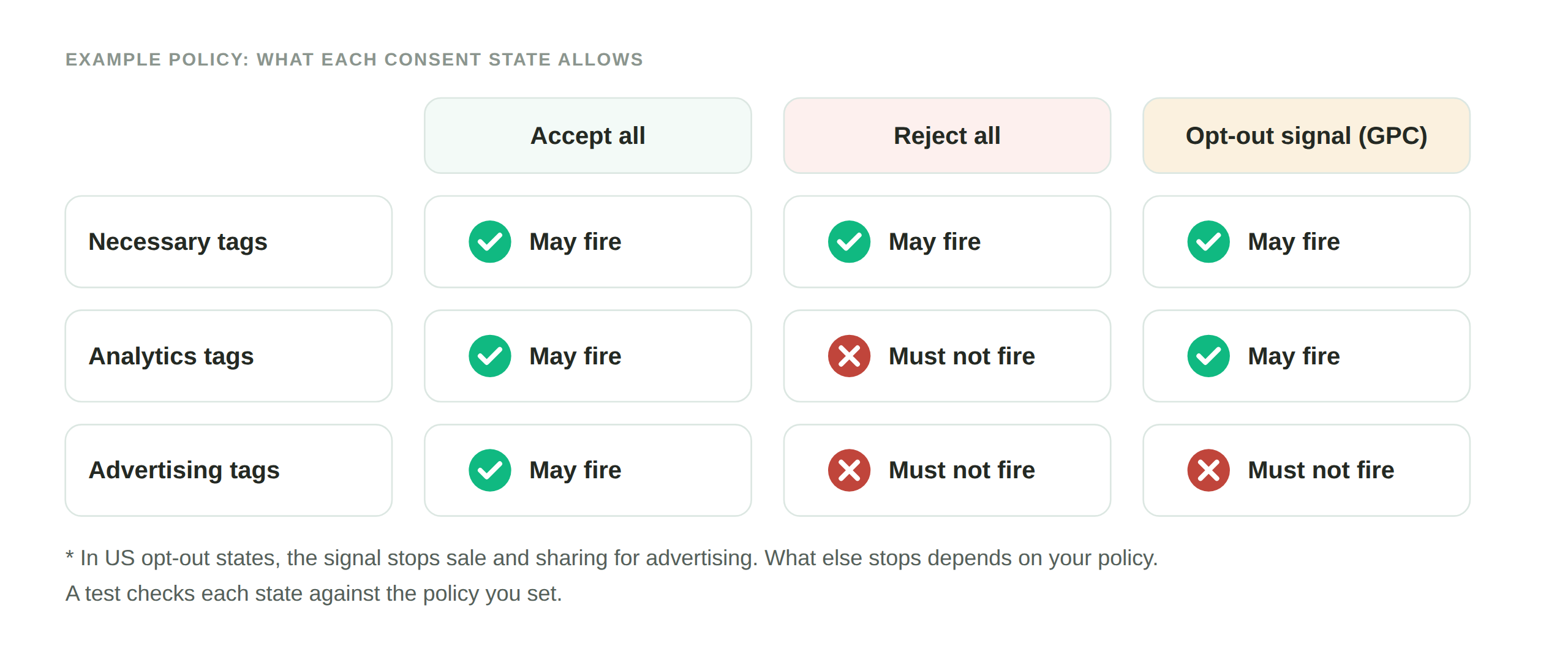
A visitor who accepts analytics only should see analytics tags fire and advertising tags stay off. A visitor who declines everything should see nothing beyond what is strictly necessary. A visitor who accepts everything should see every tag fire as intended. And a visitor whose browser broadcasts a Global Privacy Control signal should be treated as having opted out of sale and sharing, which in a growing number of states, 12 as of 2026, is a legally binding request.
The failure mode is granular. A setup can pass the simple accept-all test and still leak an advertising tag under an analytics-only choice, because that specific combination was never checked.
How to verify each consent state
The manual check is to load the site, make one specific consent choice, and inspect which tags fire against which you allowed. Then repeat for the next combination, and the next, on each page that matters. It is thorough only if you have the patience to run every state on every key page, which is why it rarely stays current.
How DataTrue verifies it:
- DataTrue runs your site in each consent state: consent granted in full, declined in full, and individual categories accepted or refused.
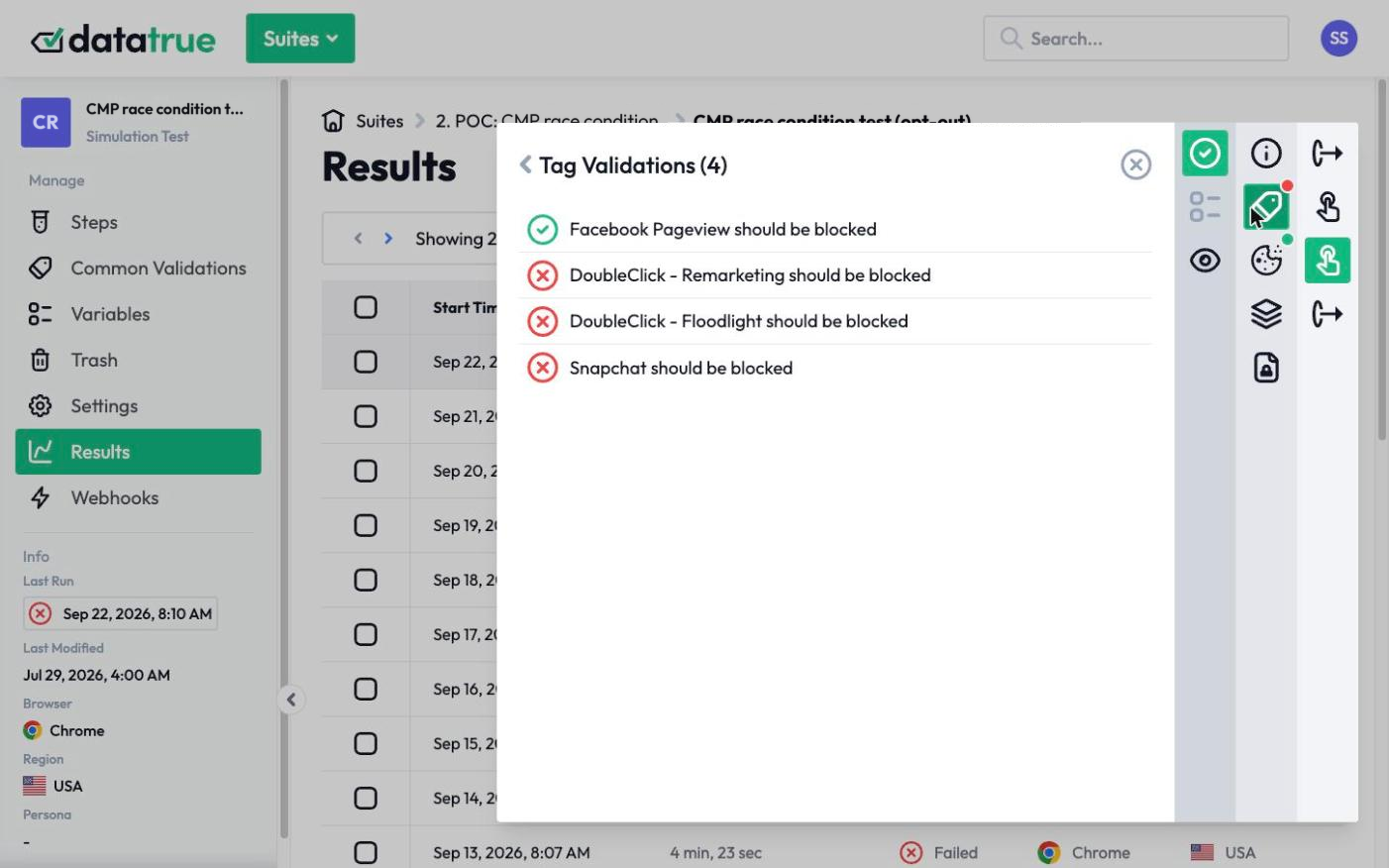
- The Tag Policy and Cookie Policy rules define, for each state, which tags are Allowed, Not allowed, or Required. A tag that fires where it is Not allowed is flagged as a failure, and a tag that is missing where it is Required is flagged too.
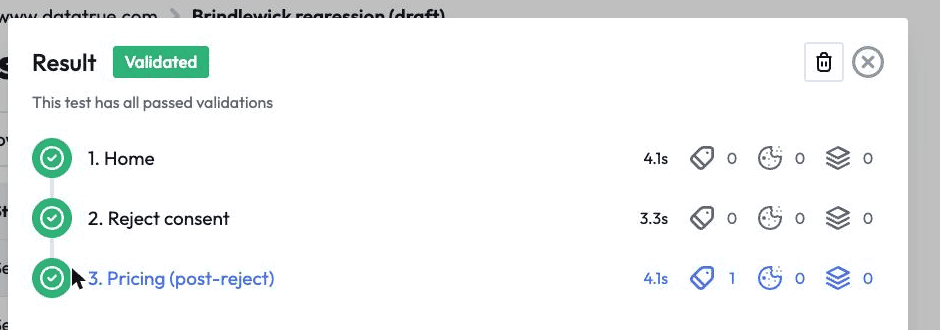
- A Simulation test walks a real journey, such as a registration or a checkout, through a chosen consent state and checks what each tag transmitted at each step, so consent is verified during a real transaction and not just on a landing page.
- Global Privacy Control is tested by loading the site with a GPC-signalling browser extension enabled and confirming that the tags required to stop under an opt-out actually stop. The signal comes from a real browser, the way a real visitor’s setting would reach your site.
Every run produces a timestamped record of what fired under which consent state. That is the audit trail a privacy or legal team can show a regulator to prove the consent system works, not just that it is switched on.
Catch a consent regression before it ships
A consent setup that passed last month can break on the next release, when a new tag is added or a category mapping changes. DataTrue can run the full set of consent-state checks against a draft GTM Preview or Adobe Tags container before publish, and automatically on each release through its CI API, so a regression is caught in staging.
See how consent verification works
Questions
What does it mean for a tag to respect consent?
It means the tag fires only in the consent states where the visitor allowed it, and stays off in the states where they did not. Because a visitor can accept some categories and decline others, respecting consent means following each specific choice, not just checking that consent was given.
Why isn’t checking “accept all” enough?
Because mixed states are where partial failures hide. A tag can behave correctly when a visitor accepts everything and still fire when they accepted analytics but declined advertising. Each combination has to be checked to know the setup holds.
How does DataTrue test Global Privacy Control?
DataTrue loads your site with a GPC-signalling browser extension enabled and confirms that the tags required to stop under a GPC opt-out actually stop. The signal comes from a real browser, which is how a real visitor’s GPC setting would reach your site.
Can DataTrue verify consent during a checkout or signup, not just on a landing page?
Yes. A Simulation test walks the full journey through a chosen consent state and checks what each tag transmitted at each step, so consent is verified during the actual transaction.
See what your tags do in every consent state
DataTrue loads your real pages as a visitor who accepts, rejects, or sends an opt-out signal, and reads what each tag sends. A tag that ignores the visitor’s choice shows up in a test.
- Every page, with coverage scans
- Scheduled runs, with alerts when a result changes
- Full journeys, like checkout and signup, in each consent state
- What each tag sent, field by field
- PII detection with test personas
- iOS and Android app testing
- Pre-publish testing for GTM and Adobe Tags
- REST API, plus Slack and Jira alerts
The full platform, every feature, free for 30 days.