Put tag testing in your pipeline, and the results where your team works
DataTrue is built to run inside your release process. Trigger tests from CI/CD, gate a release on the result, pull the data into your own dashboards, and send a failure straight to Slack, Teams, or Jira as soon as a scan reports it.
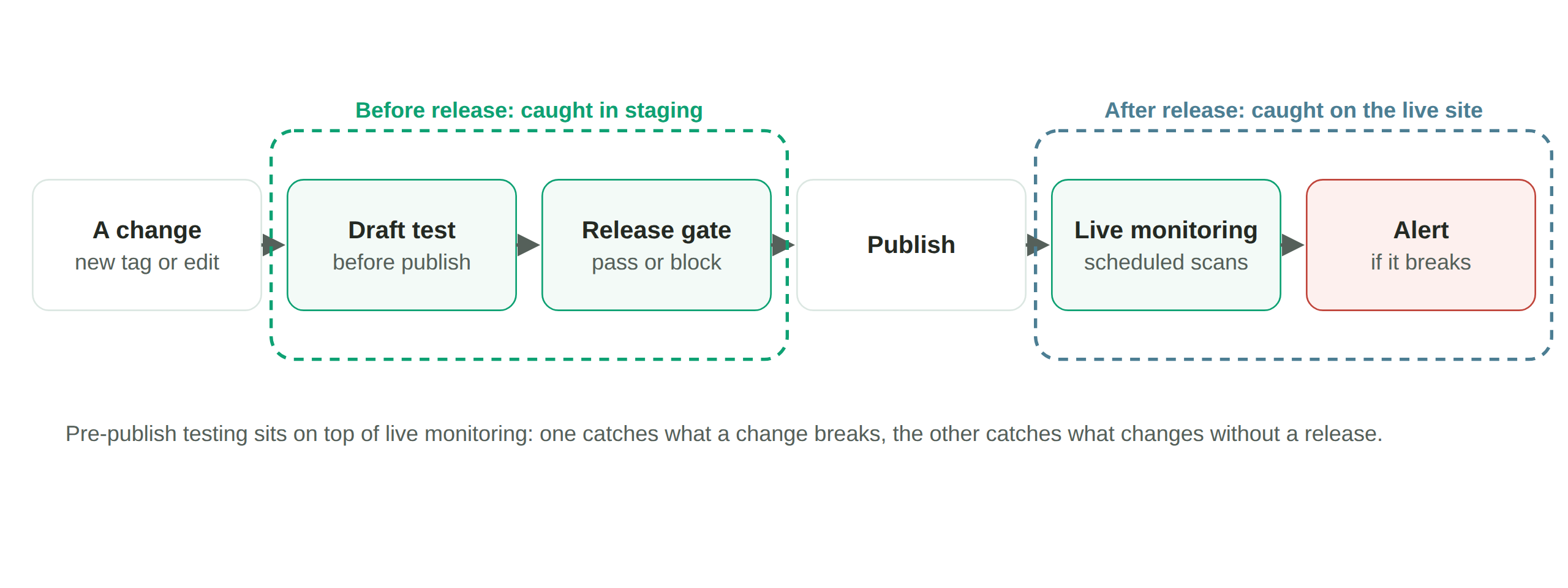
DataTrue integrates tag testing into your development workflow through three REST APIs, a command-line tool, and language SDKs. Build and manage tests in code, run them from your CI/CD pipeline before each release, read results into your own reporting, and route alerts to your team’s tools. A failing tag test blocks a release like a failing unit test.













Three REST APIs, one for each job
DataTrue exposes three REST APIs, all authenticated with an API key.
Management API
Create, read, update, and delete tests in code: accounts, suites, tests, steps, and validations. It is the programmatic mirror of the app, useful for building tests in bulk or keeping them in version control.
Continuous Integration (CI) API
Trigger a test or a suite from an external system and poll it until it finishes. This is the API behind release gating: kick off a run on deploy, wait for the result, pass or fail the build.
Reporting API
Read run results and historical compliance data back out, broken down by tag across tests, pages, and journey steps, to feed your own dashboards or a governance report.
A CLI and language SDKs
Prefer the command line or your own code? The DataTrue CLI runs resource management and test execution from a terminal or a build script.
For deeper integration there are SDKs: a JavaScript and TypeScript client and a Ruby client, both wrapping the REST APIs so you are not hand-rolling HTTP calls.
Gate a release on the result
Wire the CI API into your pipeline so a regression suite runs before each release and a failing tag blocks the deploy, the same way a failing unit test does. Nothing broken reaches production, because the pipeline stops first.
How do alerts get to Slack, Teams, or Jira?
DataTrue sends a webhook, a standard HTTP POST, when a run or test errors, fails, finishes, or passes. Because it is a plain webhook, you can point it at almost anything that accepts one: Slack, Microsoft Teams, Jira, PagerDuty, or your own internal service.

There is no lock-in to a single chat tool, and no waiting for DataTrue to build a native integration for the tool you happen to use. See continuous monitoring & alerting.
How do you report on results in your own tools?
The Reporting API and the Data Studio connector both pull DataTrue results into the dashboards your team already reads, next to the rest of your analytics. See Data Studio connector and continuous monitoring & alerting.
Nothing is installed on your site. DataTrue doesn’t ask you to add any script, tag or code to your pages, so there is nothing to remove if you stop.
Wire tag testing into your pipeline.
Start a free 30-day trialQuestions
Does DataTrue have an API?
Yes, three REST APIs: a Management API for building and managing tests, a Continuous Integration API for running them, and a Reporting API for reading results back out. There is also a CLI and JavaScript and Ruby SDKs.
Can DataTrue run in CI/CD?
Yes. Trigger tests from your pipeline through the CI API or the CLI and block a release on a failing test.
How do alerts get to Slack or Teams?
Through webhooks. DataTrue posts to any webhook URL on run and test events, so Slack, Microsoft Teams, Jira, and most other tools work without a dedicated integration.
Can I pull results into my own dashboards?
Yes, through the Reporting API and the Data Studio connector.
Does it support GraphQL?
No. DataTrue does not offer a public GraphQL API. Its APIs are REST.
Related: pre-publish tag testing, continuous monitoring & alerting, Data Studio connector.
Put your tag and consent testing on a schedule
DataTrue runs coverage scans, journeys and consent checks on your live site, reads what each tag sends, and alerts your team when a result changes. There’s nothing of ours to install on your pages.
- Every page, with coverage scans
- Scheduled runs, with alerts when a result changes
- Full journeys, like checkout and signup, in each consent state
- What each tag sent, field by field
- PII detection with test personas
- iOS and Android app testing
- Pre-publish testing for GTM and Adobe Tags
- REST API, plus Slack and Jira alerts
The full platform, every feature, free for 30 days.